Working With Files
Key Goals
- Working with files
- Working with links
- Analyzing text files
- Comparing text and binary files
- Modifing file content through command line
- Search for files
Section Objectives
- Finding files:
- which
- find
- locate
- List file content:
- less
- cat
- head
- tail
- wc
- Working with files:
- cp
- mv
- rm
- touch
- mkdir
- Working with links:
- Hard link
- Soft link
- inode
- Searching in files:
- grep
- Editing files through the command line:
- sed
- Comparing files
- diff
- md5sum
Exercise
Note
Before starting the exercise, install the following packages
yum install -y words # Installs a file that contains a long list of words
yum install -y ntp
yum install -y tree
Finding files
- Which binary file executes when running the lsb_release command?
- Find the words file
- Find the ntp.conf file
- Copy all the pdf files located in /usr/share/doc/ to your home directory
- Delete all the pdf files located in your home directory
- List all the files that are bigger than 10MB inside the /boot directory
- List all the files that are bigger than 10MB inside the /boot directory and their sizes
Reading from files
- Scenario:
- Display the top 27 lines of the words file.
- Display the bottom 30 lines of the words file.
- Which flag is needed in order to open a file using tail in a continus mode?
- List the number of lines of the words file.
Working with files
- Scenario:
- Copy the /etc/hosts file to your home directory.
- Copy it again in an interactive mode.
- Move the file to the /tmp directory.
- Remove the /tmp/hosts file.
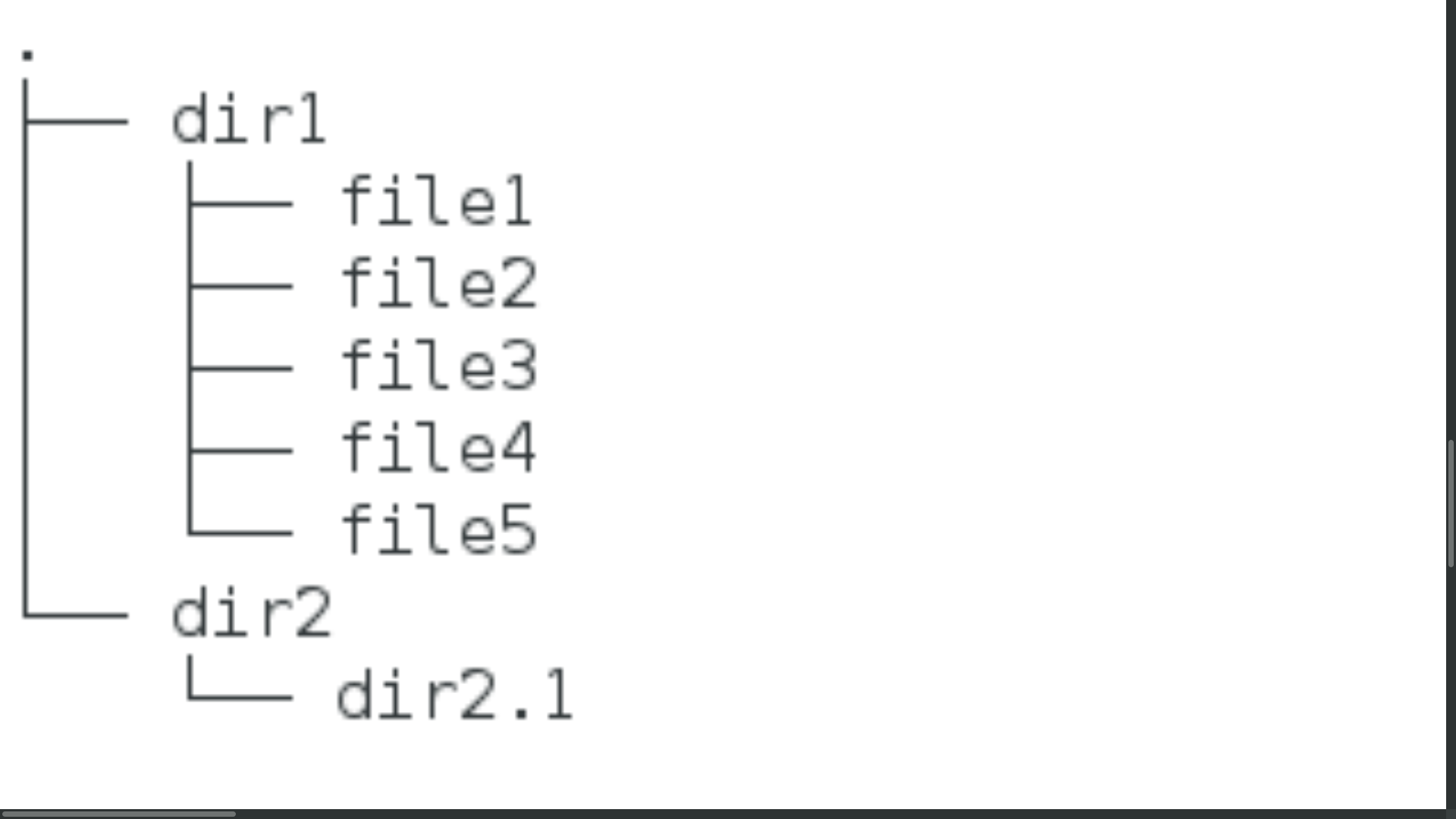
- Create the following structure inside your home directory (use wilde cards) and then delete it recursively:
Working with links
- Explain what is an inode.
- Explain the difference between hard link and soft link
- How can we find the inode of a specific file?
- Scenario: * Create tempdir directory inside your home directory. * How many hard links ~/tempdir has? * Explain why in your opinion it has that amount of hard links.
- Scenario: * How many hard links the /etc directory has? * Explain why in your opinion it has that amount of hard links.
- Scenario: * Create tempfile1 file inside your home directory that contains the ‘Hello World’ sentance (use one command). * Create a symlink(soft link) tempfile2 file inside your home directory to tempfile1.
- Try to create a hard link from your home directory to your kernel file that located in the /boot directory? Explain what happend and why.
Searching in files
- Scenario:
- Run yum list installed (it prints all the installed packages on your system)
- Run it again but now grep only the installed packages that their name starts with ‘kernel’.
- Run it again but now paste the output to a kernel_pack.txt file.
- Append to the kernel_pack.txt file the following 3 lines (use: ‘echo’ and ‘>>’):
- newline1
- newline2
- newline3
- Cat the kernel_pack.txt and grep only the newlines.
- Use only grep (without cat) to select all the lines execpt the ‘newline2’ of the kernel_pack.txt file.
- Which alias the grep command is uses by default?
- Scenario (note: use the words file):
- List all the words that start with ‘io’.
- List all the words that end with ‘ion’.
- List all the words that start with ‘po’, end with ‘ute’ and contain 7 characters.
- List all the words that contain five vowels in a row (vowels: a,e,i,o,u).
Editing files through the command line
- Scenario:
- Install the ntp package, run: yum install -y ntp
- Copy the ntp.conf file to your home directory
- Delete all blank lines
- Delete all commented lines
Compering Files
- Scenario:
- Copy the top 10 words of the words file to a new file inside your home directory (name it file1)
- Copy the top 9 words of the words file to a new file inside your home directory (name it file2)
- Use diff to compare the files and examin the difference
- Change the first 2 lines inside file1 to ‘hello’ (using vim)
- Use diff to compare the files and examine the difference
- Explain what is a hash of a file?
- In which use cases would you use hash to comapre files instead of the diff command?
- Use the md5sum command to calculate the hash of the /etc/hosts file.